
Price Explanations sit on top of the existing pricing breakdown you already have. Nothing about your pricing logic changes. You see the same recommendations as before, just with a clearer story behind each price.
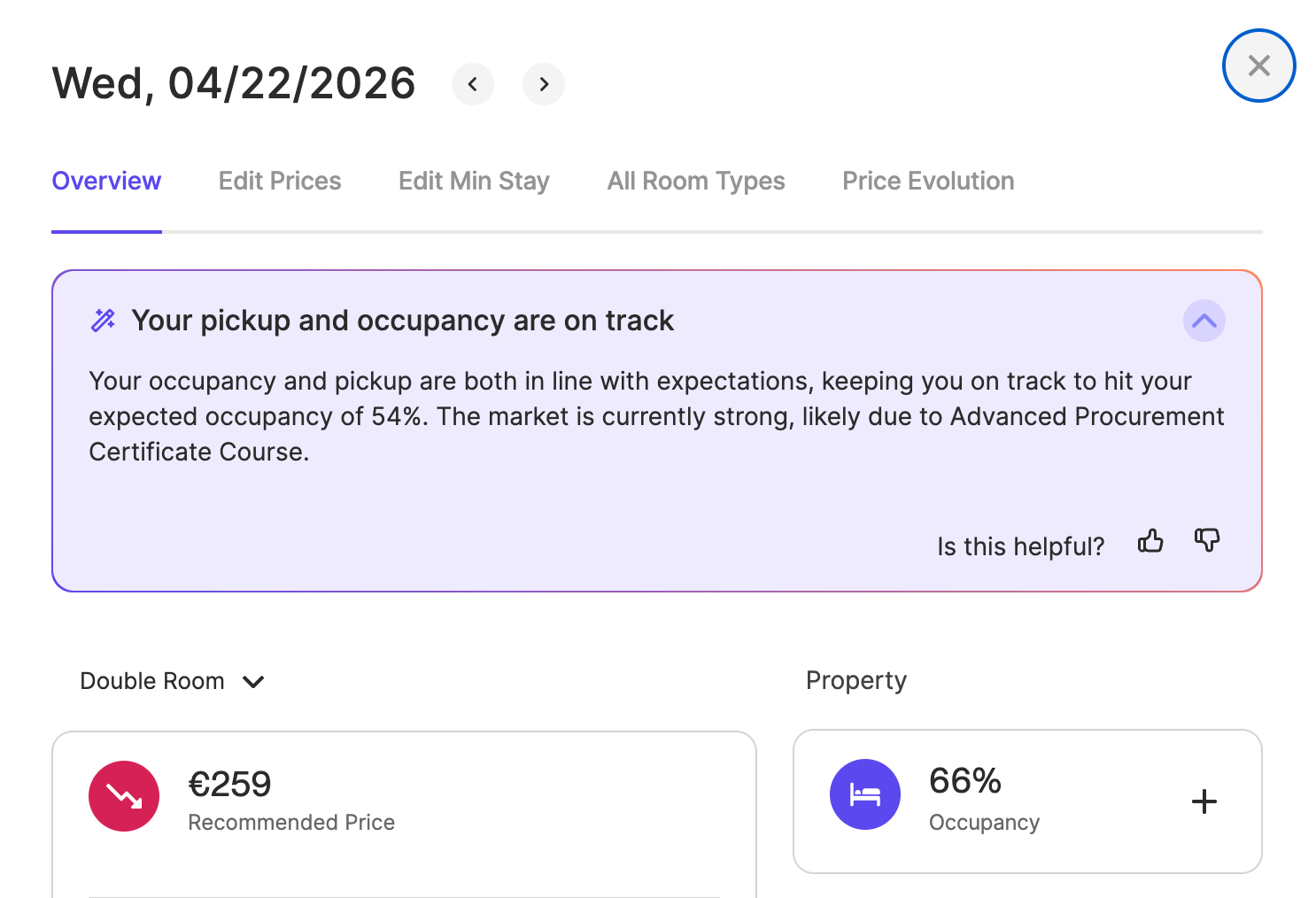
Available now in English for all customers. No setup required.
Where to Find It
Click any date in your pricing calendar. The price explanation appears in the drawer that opens. No setup, no extra steps.
How It Works
You set monthly target occupancy under your Occupancy Strategy. But the price explanation is not about your monthly target — it's about one specific date and how that date is performing right now.
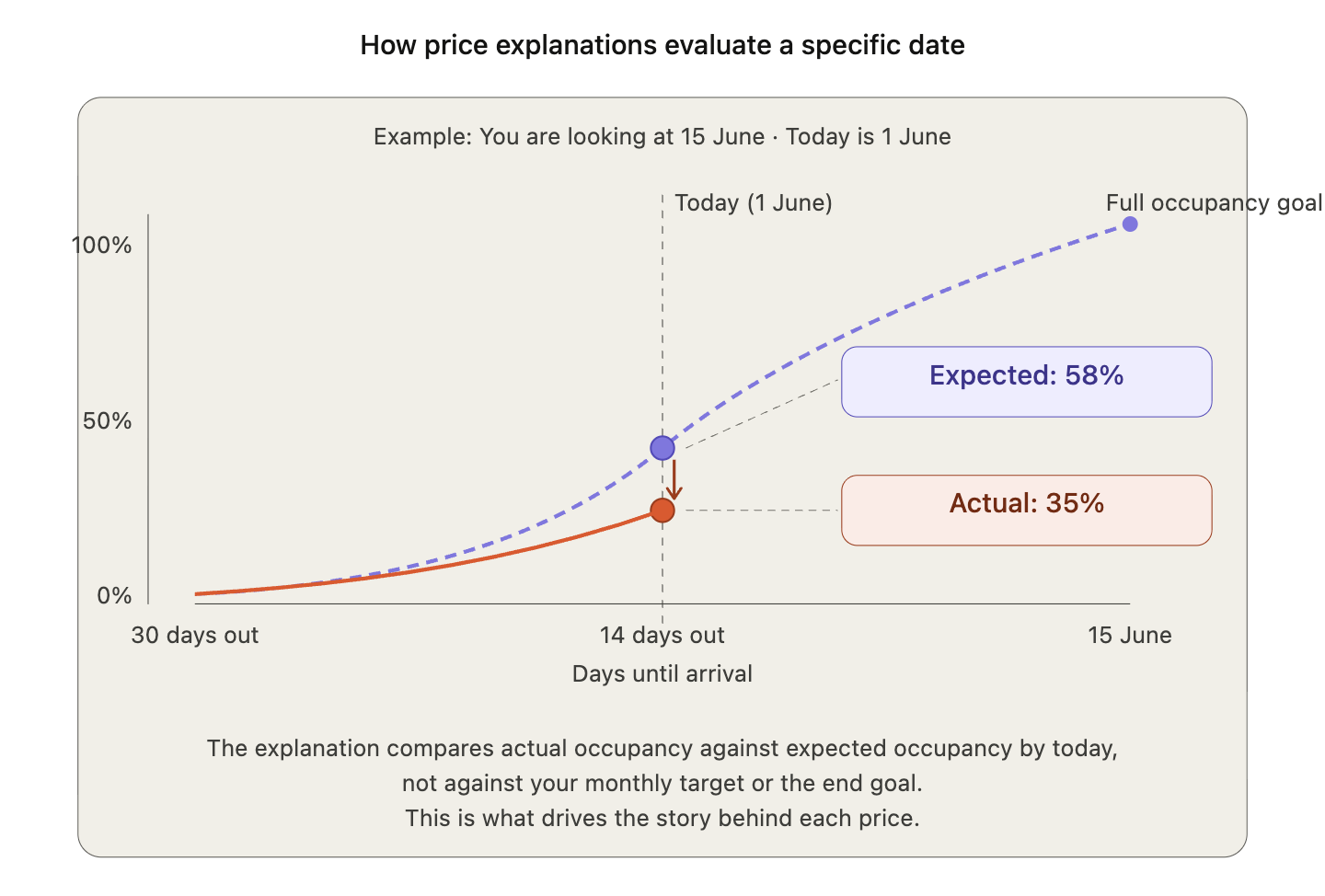
Using your lead time (median booking window), the system calculates two things for the date you're viewing:
- Expected occupancy by today — how full this date should be at this point in time.
- Expected pickup — how many new bookings this date should have received in the last week, based on how many rooms are still left to sell.
The explanation compares these expected values to what actually happened and tells you whether the date is ahead, on track, or behind — and how the price has responded.
A note on "Expected Rooms Sold" in the pricing breakdown
The pricing breakdown below the price explanation shows "Expected Rooms Sold" — this is a monthly figure showing how many rooms should be sold for the entire month by today.
The price explanation shows expected occupancy for that specific date by today. They are different numbers:
- Pricing breakdown: How is the whole month tracking?
- Price explanation: How is this one date tracking?
What the price refers to
The recommended price shown is for your reference room. Occupancy details like current and expected occupancy reflect your entire property.
Examples
These show the kinds of explanations you'll see when you click on a date.
Bookings behind expected with slow pickup
You click on 15 June and see:
Behind expected occupancy with slow bookings, price adjusted
Your occupancy is 35%, compared to the 58% expected by today. After a slow week with just 1 booking versus 4 expected, we've lowered your occupancy factor to -15%, setting your price to €125 to help stimulate demand.
15 June isn't as full as it should be, and recent bookings have been slow. The price has been lowered to help attract more bookings. The occupancy factor (-15%) shows how much the occupancy position is pulling the price down.
Your minimum price is holding you back
You click on 5 August and see:
Your minimum price is holding you back
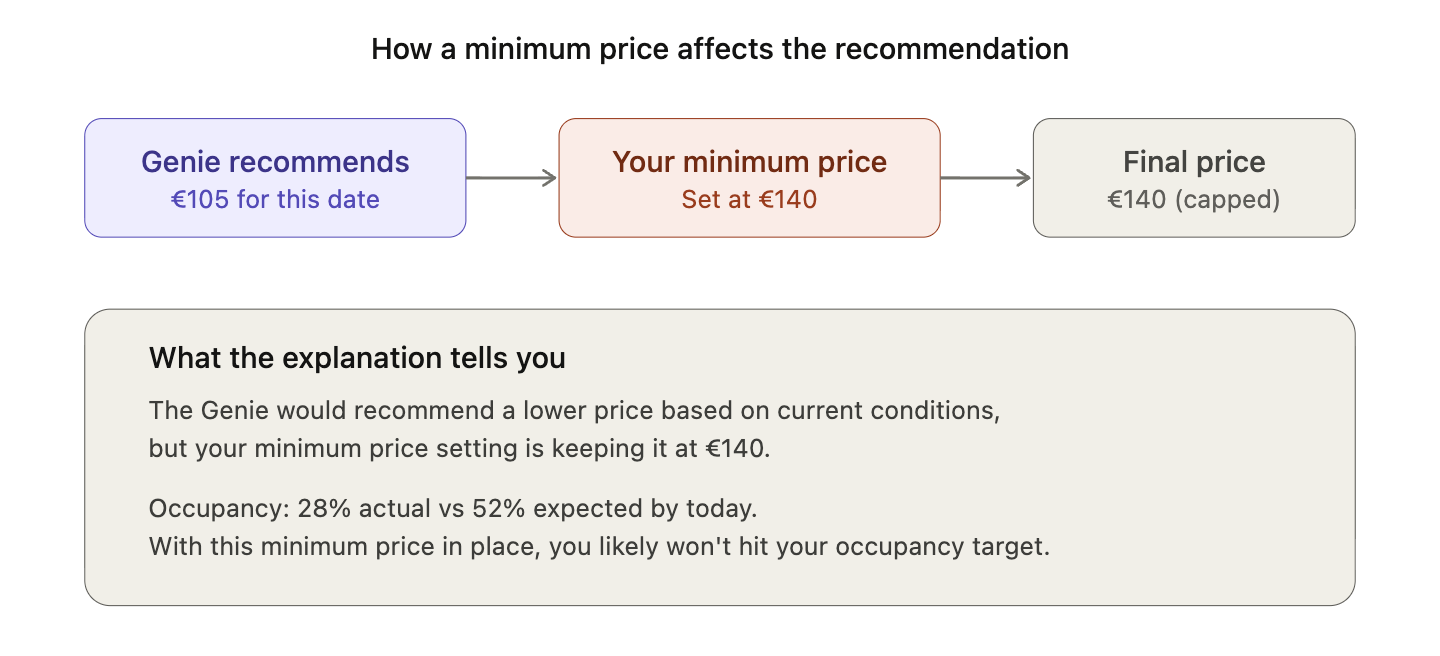
Your minimum price is keeping your price at €140, above today's recommended €105. Occupancy is low at 28% compared to the expected 52% by today. With the minimum price in place, you likely won't hit your expected occupancy.
The recommended price would be €105, but your minimum price is keeping it at €140. Your settings may be costing you bookings — review whether your minimum price is still right for this period.
Occupancy ahead with strong momentum
You click on 12 September and see:
Occupancy ahead of expected with strong momentum
Your occupancy is 78% which is above your expected 55% by today, and last week's pickup is high — 8 bookings compared to 4 expected. Your price is at €210, reflecting an occupancy factor of +18% to capture this strong demand.
12 September is filling faster than expected, and recent pickup is strong. The occupancy factor (+18%) is pushing the price up to capture more revenue from the remaining rooms.
What the Explanation Can Cover
Each explanation highlights the factors that matter most for that date. Not all of these will appear every time.
- Occupancy vs expected — is the date ahead, on track, or behind where it should be by today?
- Pickup vs expected — are new bookings coming in faster or slower than expected this week? Strong pickup means momentum is building. Weak pickup means bookings have slowed.
- Your settings — is a minimum price, maximum price, or fixed price limiting the recommended price? This catches when your own settings might be costing you money or bookings.
- Market demand — are broader market conditions or local events influencing the price?
- Occupancy factor — a percentage showing how much the occupancy position is pushing the price up or down. Positive means price is being pushed up (strong demand). Negative means price is being pulled down (weaker demand).
Types of Explanations
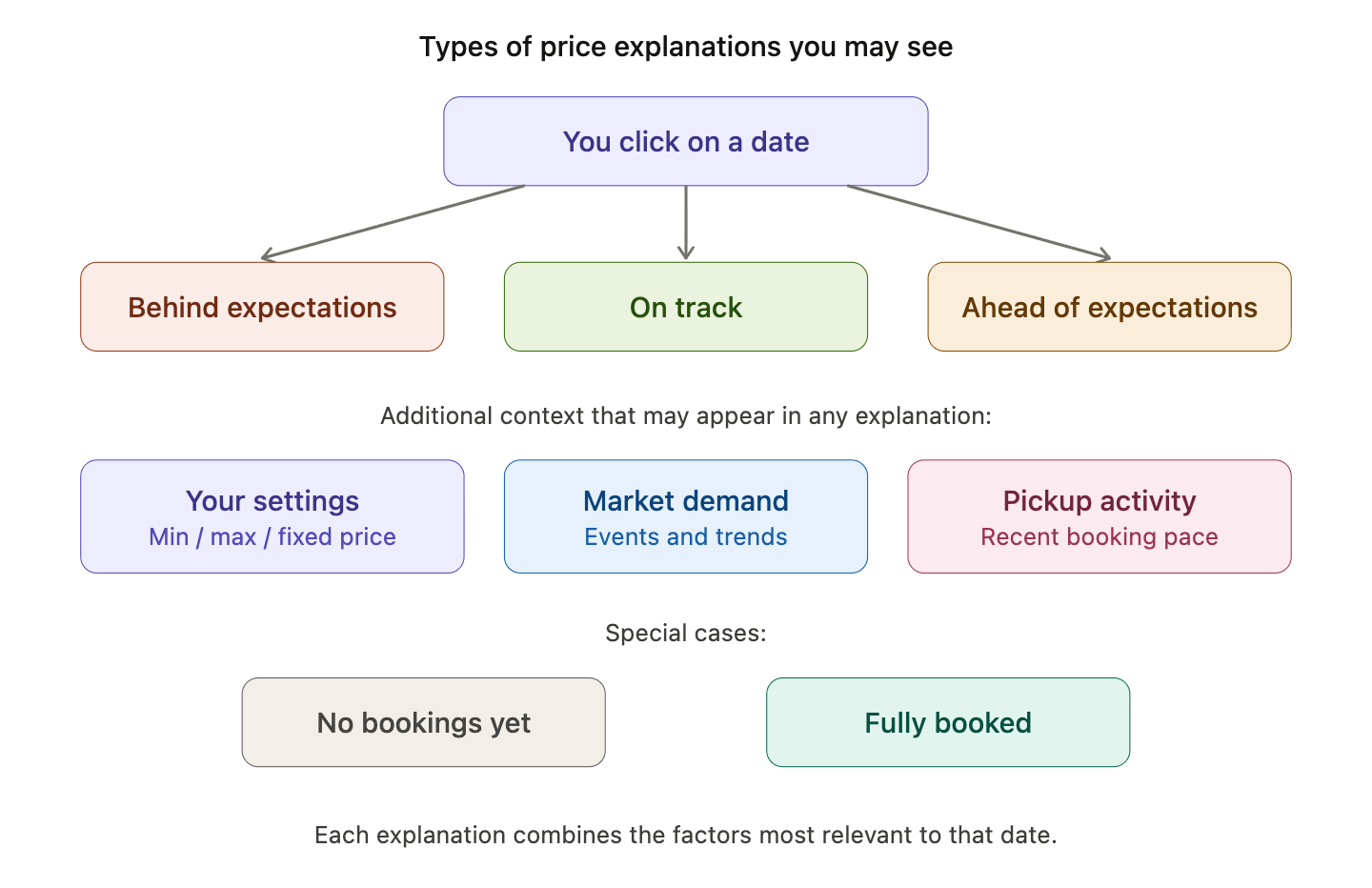
- Your settings are limiting the price: A minimum, maximum, or fixed price is affecting the recommendation. Check whether the setting still makes sense.
- No bookings yet: No rooms are sold for this date. The price has been adjusted to help attract first bookings.
- Fully booked: All rooms are sold. If it sold out well in advance, the explanation may note that demand came early.
- On track: Occupancy is in line with expectations. The price tends to hold steady.
- Behind expectations: The date is less full than expected. The explanation shows how far behind, what pickup looks like, and whether the price has been adjusted.
- Ahead of expectations: The date is filling faster than expected. The price may have been adjusted upward.
- Market demand or events: Strong market demand or local events are influencing the price.
- No single factor stands out: Conditions are balanced. The explanation gives a general summary of occupancy, pickup, and price.
Tips
- The explanation is about one date, not the whole month. Expected occupancy is where this specific date should be right now — not your monthly target.
- Check when your settings are flagged. A cap set months ago might be costing you money today.
- Watch pickup trends. Behind on occupancy but strong pickup? The date may be recovering. On track overall but pickup has slowed? That could be an early signal.
- A stable price is fine. It means conditions support the current recommendation.
Things to Know
- Available when your RoomPriceGenie language is set to English. More languages coming soon.
- This sits on top of your existing pricing breakdown — it doesn't replace it.
- Expected occupancy in the price explanation is for one specific date. "Expected Rooms Sold" in the pricing breakdown is for the entire month. They answer different questions.
- The recommended price is for your reference room. Occupancy details reflect your entire property.
- Nothing about your pricing logic changes. This is a transparency layer, not a pricing change.
FAQ
Why does the explanation talk about expected occupancy when I set monthly targets? The explanation is about the specific date you clicked. Your lead time is used to calculate where that date should be right now — that's different from the monthly target you see elsewhere.
Is expected occupancy the same as my monthly target? No. Your monthly target is a broader goal under Occupancy Strategy. Expected occupancy in the explanation is a date-level calculation based on your lead time.
Why is the expected occupancy different from "Expected Rooms Sold" in the pricing breakdown? They measure different things. The pricing breakdown shows expected rooms sold for the entire month by today. The price explanation shows expected occupancy for that specific date by today.
What is pickup? Pickup is the number of new bookings for a date in the last week. Expected pickup is how many were expected based on the date's position in the booking window and how many rooms are left to sell. Together they show whether recent momentum is strong or weak.
Why does the explanation mention my minimum or maximum price? Your settings are limiting the recommendation. The price based on current conditions would be different — your cap might be costing you money or bookings.
Why does the explanation mention a fixed price? You've fixed the price for that date and it differs from the recommendation. Consider percentage adjustments for more flexibility.
Why did the price stay the same? The date may be pacing as expected, or a setting is holding it in place. A stable price can mean things are on track.
Is this AI making up explanations? No. Pre-written scenarios populated with your actual pricing data. No generative AI, no guesswork.
Who can use this? All RoomPriceGenie customers whose language is set to English. No setup required.
Need Help?
If you're unsure about what an explanation means or need help adjusting your settings, contact our support team — we're happy to help.