![rpg_Logo_darkgrey.png]](https://help.roompricegenie.com/hs-fs/hubfs/rpg_Logo_darkgrey.png?height=40&name=rpg_Logo_darkgrey.png)
What Is the Activity Log?
The Activity Log is a chronological record of manual price adjustments made by users for a specific property.
Each log entry captures:
- Who made the change.
- When the change was made.
- What type of adjustment was applied.
- Which dates were affected.
This allows teams to quickly trace pricing changes without relying on memory, handovers, or support requests.
Why use the Activity log?
- Reduce time investigating what price adjustment was made, when, and by whom.
- Improve collaboration when multiple people need visibility into team actions.
How the Activity Log Works
The Activity Log tracks manual pricing adjustments made by the user(s) of your account.
Important: tracking starts from the feature launch date, historical data is not available.
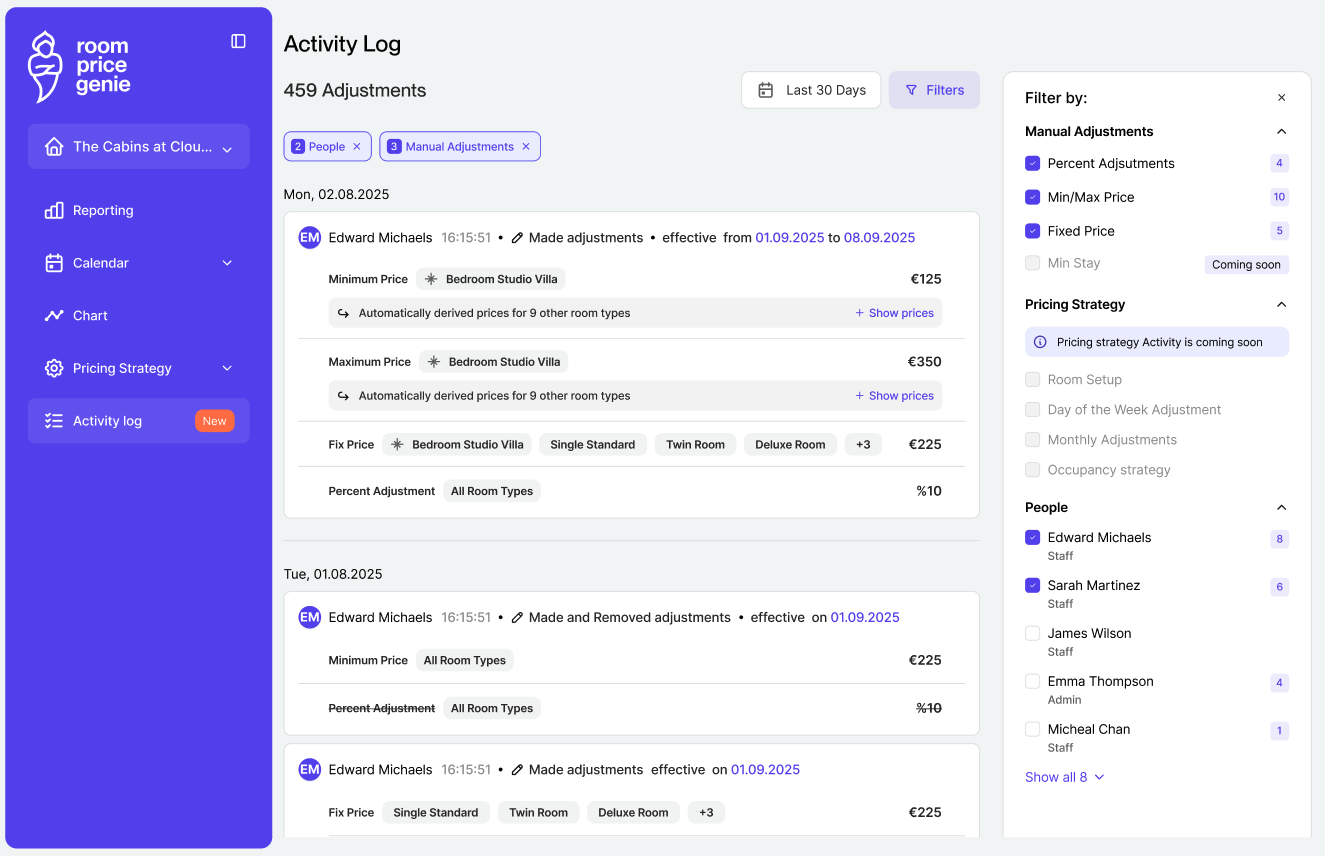
For each manual price adjustment, the Activity Log shows:
- User: who made the adjustment.
- Timestamp: data and time of the adjustment.
- Affected dates: the dates impacted by the adjustment.
- Adjustment type: currently, three adjustment types are covered:
- Percentage adjustments.
- Fixed price.
- Minimum and maximum price.
- Value change: old value vs new value
Customisation of the log is possible by using filters:
- View adjustments made by a specific user.
- View adjustment made in a specific date range.
- Filter on specific adjustment types (% adjustments, fixed price adjustments, minimum or maximum price adjustments),
FAQ
Can I see changes made before the Activity Log was launched?
No. The Activity Log only records actions from the go-live date onward.
Are automated or system-generated price changes included?
No, only manual pricing adjustments made by users are tracked.
Can I download or share the Activity Log?
No. Export functionality is not available.